Four free skills for Claude: month-end close and Cyprus VAT
Four free, open-source skills teach Claude to review a month-end close and prepare a draft Cyprus VAT return with its XML file. No Cybooks account needed.
By Christopher DosinFounder / CTO

10 min read
In this article
- 1 table
- 4 key figures
Contents
- Four skills, and the one question each answers
- A skill is a folder of rules, and code does the sums
- From 14 documents to thirteen boxes and two XML files
- Three steps to install them in Claude
- Connected, Claude reads VAT boxes 1 to 5 from your books
- One conversation, three jobs: an invoice, a bill, the bank
- Read only: the skills post nothing and file nothing
- 82 script tests, and what is not tested yet
- Final thoughts
Claude can read a bill. A VAT return needs more: the same kind of bill in the same box, every quarter.
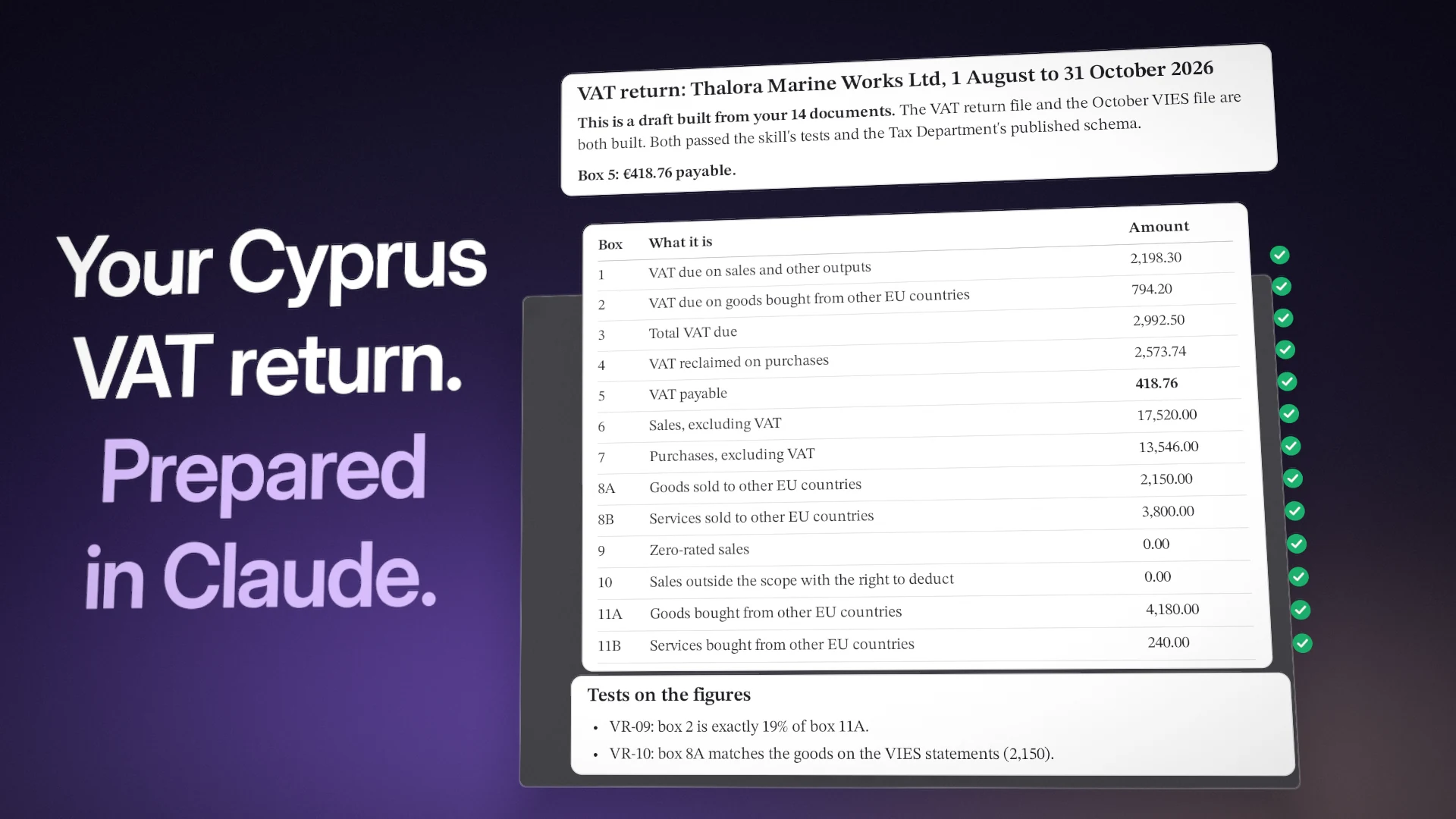
How does an AI assistant do that? With written rules, and code that does the sums.
- Skills for Claude, free and open source
- 4
- Skills for Claude, free and open source
- Checks in the month-end close catalogue
- 57
- Checks in the month-end close catalogue
- Tests on the thirteen boxes of a Cyprus VAT return
- 17
- Tests on the thirteen boxes of a Cyprus VAT return
- Automated tests of the bundled scripts
- 82
- Automated tests of the bundled scripts
We have written our rules down and published them as four skills for Claude. Three review a month-end close on any double-entry books. The fourth prepares a draft Cyprus VAT return from your bills and invoices, with all thirteen boxes and the XML file for Tax For All.
They are free, open source under the MIT licence, and they work without a Cybooks account. The Tax Department’s XML schemas inside the VAT return skill are the Ministry of Finance’s, included unchanged, and are not covered by the MIT licence.
Key takeaways
- Four skills, free and open source. They are on GitHub under the MIT licence, and they work on exports from any accounting software.
- Three for the close, one for Cyprus VAT. 57 checks, 15 tests on journal entries, a scorecard of six dimensions, and a VAT return with 17 tests on its thirteen boxes.
- Code does the sums. Claude reads the documents. Code works out the sums and the tests, and “Could not be checked” is an answer of its own.
- Read only. A skill posts nothing to your books and files nothing. Connected, the one thing it can start is a review run, after you say yes. You upload the VAT file yourself.
- Connected, Claude works on live books. With the Cybooks connector, on the Premium plan, Claude reads your VAT position, creates and approves invoices and bills, and reconciles bank lines.
Each of the four skills answers one question, in the same order every time.
| Skill | The question it answers | What is inside |
|---|---|---|
| Month-end close | What is still open before this month can be closed? | 57 checks in eight areas, at three depths |
| Journal entry screen | Which journal entries would a reviewer want to look at? | 15 tests, the findings ranked |
| Close readiness scorecard | Are the books ready to close: yes, with notes, or not yet? | Six dimensions, one verdict |
| Cyprus VAT return | Here are my invoices: what is my Cyprus VAT return? | 17 tests on the boxes, 12 on the lines, two XML files |
The first three work on any double-entry books. The fourth is written for Cyprus.
Each skill works alone. Install more than one, and the scorecard uses what the others found.
A skill is a folder with instructions, reference material and sometimes a script. Claude loads it when a task calls for it. The month-end close skill holds the check catalogue Cybooks runs on its customers’ books. The other three follow the same rules.
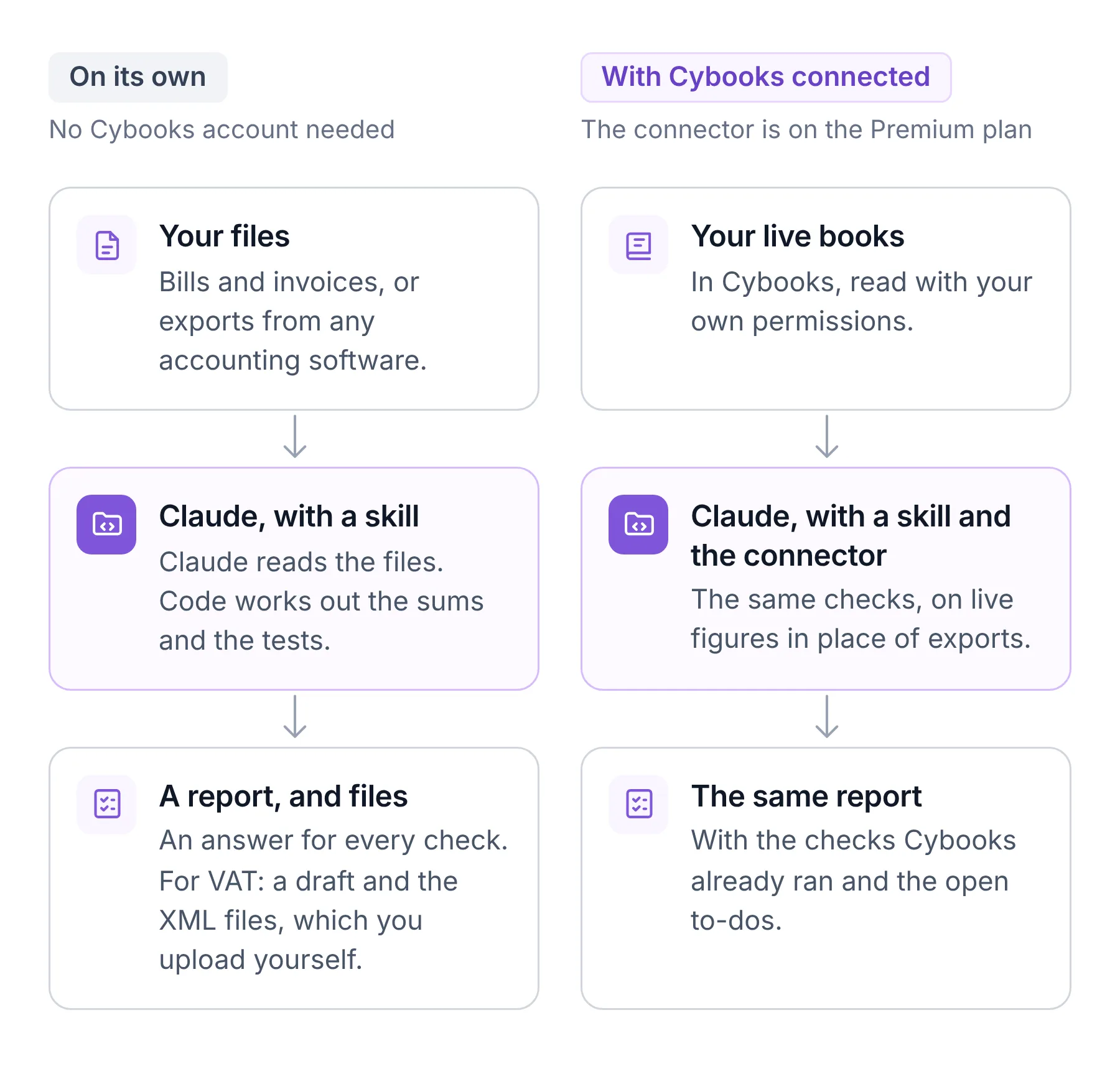
Every skill holds to the same rules. The README on GitHub lists them:
- Computed, not eyeballed. Figures come from a script, or from code over a file you named. If code cannot run, the skill says so and stops.
- Four answers. Passed, Needs a look, Could not be checked, Not relevant. “Could not be checked” is never counted as passed.
- Two grades of test. A test that compares figures can pass. A test that weighs likelihood can say Looks right or Worth a look, and no more.
- Read only. Nothing is posted, changed, closed or filed.
- No guesses. A missing figure is not zero, and a document the rules cannot place becomes a question for you.
Claude reads. The script places each document and adds up.
We gave Claude the Cyprus VAT return skill, 14 bills and invoices of a made-up company, and a short note from the bookkeeper. The note gave the VAT period, 1 August to 31 October 2026, which VIES statements were already filed, and the wish that the customers’ VAT numbers not be looked up. The request was one line: That's all our documents. Prepare the VAT return.
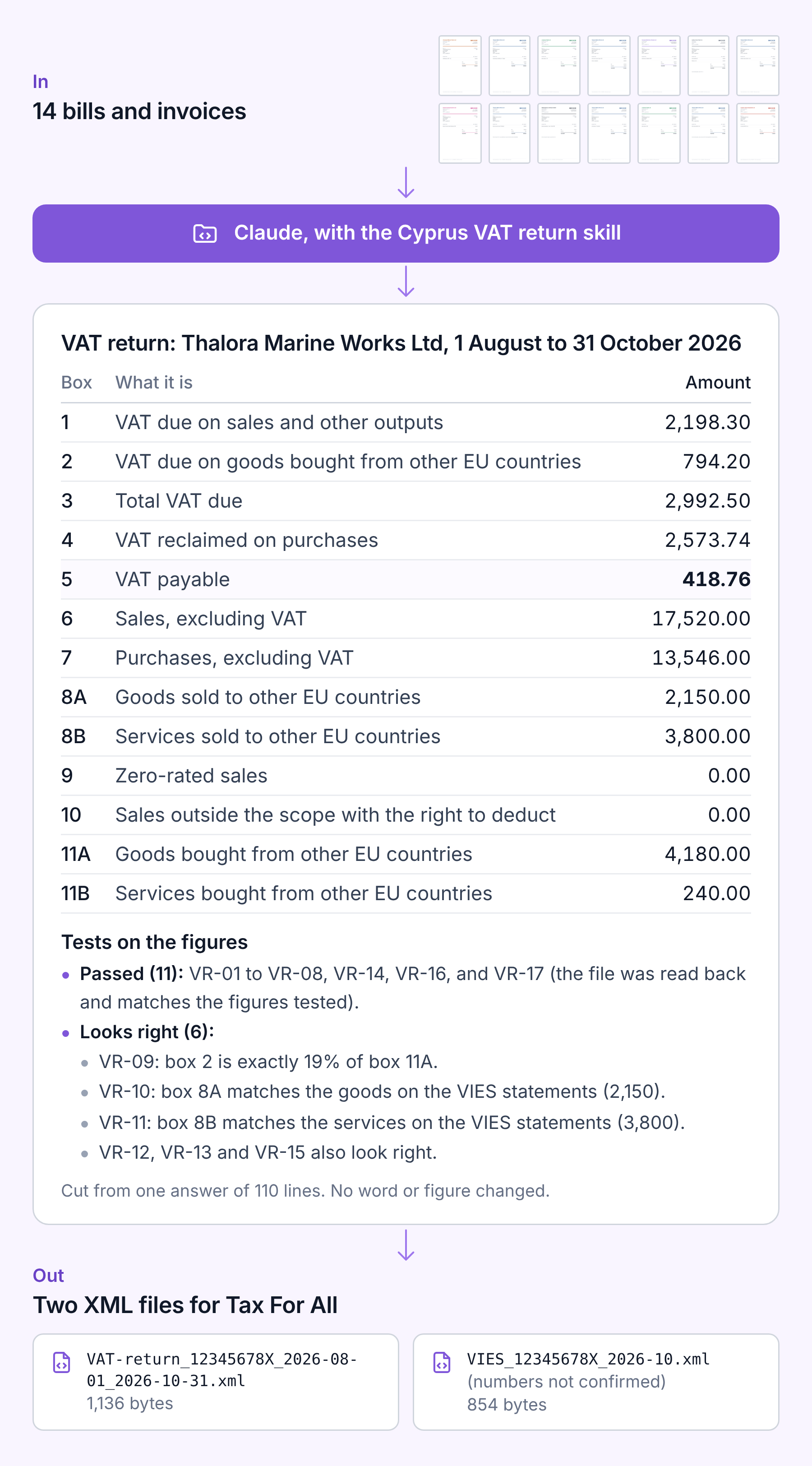
The answer opened like this:
This is a draft built from your 14 documents. The VAT return file and the October VIES file are both built. Both passed the skill's tests and the Tax Department's published schema. Nothing has been uploaded.
Three other tests, outside the 17 on the boxes, came back “Could not be checked”: documents cannot show whether any are missing, the note asked Claude not to look the customers’ VAT numbers up, and documents do not carry account names.
The whole answer runs to 110 lines. It holds:
- Every document, placed. Six groups, from sales with Cyprus VAT to a reverse charge service bought from Germany, each with the boxes it went into.
- The thirteen boxes, each with its amount.
- 17 tests on the boxes. 11 passed and 6 look right.
- What was not checked, in a section of its own: whether every document was there, tax points (the draft goes by each document’s date), payments that never had a bill, special schemes, asset sales, and the customers’ VAT numbers.
- Two XML files: the VAT return, and the VIES statement for October.
The skill does not file anything. You read the draft, or have your accountant read it, and you upload the files to Tax For All yourself.
14 documents in, thirteen boxes and two files out, and a list of what was not checked.
In the Claude apps, a skill is a file you upload once.
- Download the skills. On the Cybooks finance skills page, download the
.skillfile of each skill you want. A.skillfile is a ZIP of the skill’s folder. - Switch on code execution. Under Settings, Capabilities, switch on “Code execution and file creation”, called “Create and edit files” in the newer settings layout. The skills work their figures out with code. On Team and Enterprise, an owner checks that code execution and skills are allowed under Organization settings, Plugins & skills.
- Upload them in Claude. Open Customize, then Skills, press +, choose Create skill, then Upload a skill, and pick the file.
Skills are available on Claude’s Free, Pro, Max, Ultra, Team and Enterprise plans, with code execution switched on. Claude’s help page on skills has the details; we read it on 15 Nov 2026. We have not yet run the skills inside the Claude apps.
For Claude Code, install them in a terminal with npx skills add cybooks/skills, or inside Claude Code with /plugin install cybooks-finance --marketplace cybooks/skills. A terminal install does not reach the Claude apps. The npx installer is a third-party tool: it reports each install to its maker unless DISABLE_TELEMETRY=1 is set.
Then ask in your own words. Claude picks the skill:
- “Can we close June? Here are the trial balances for May and June.”
- “Screen this general ledger for anything a reviewer would test.”
- “Here are all our bills and invoices for Q3. Prepare the VAT return.”
Three steps in the Claude apps, or one command in a terminal.
A skill tells Claude how to do a job. The Cybooks connector gives Claude the books to do it on, signed in as you, within your permissions.
To connect, add a custom connector in Claude with the address https://app.cybooks.com.cy/mcp/cybooks and sign in. The connector works with Claude today and is part of the Premium plan. The skills stay free either way.
We connected the made-up company and asked one question: What is our VAT position for this quarter?
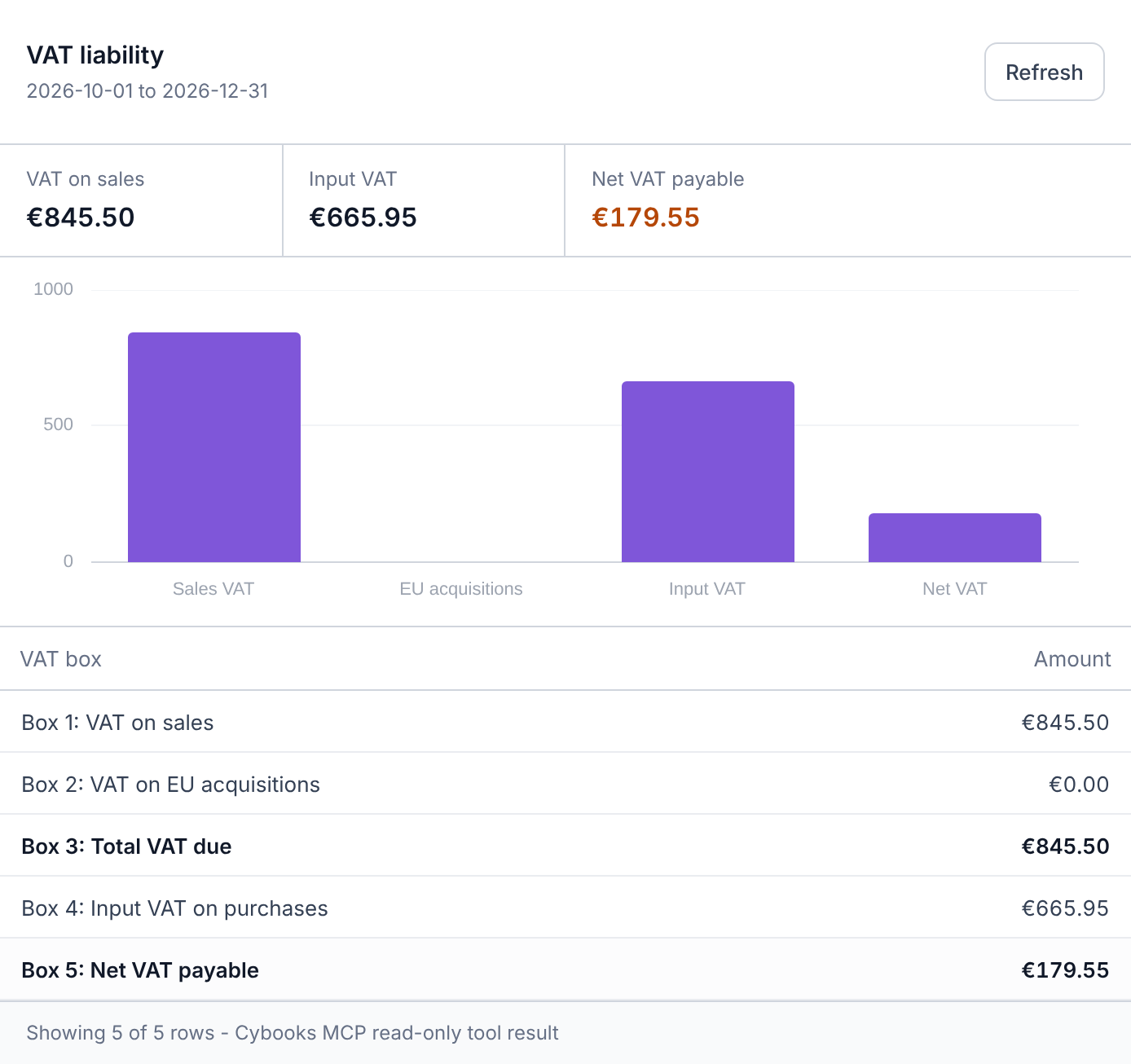
Claude answered from the same figures. It said the figure covered only half the quarter and would change as more invoices and bills came in. It also said it had assumed a calendar quarter, October to December, and offered to rerun it for another VAT period.
With the connector on, the four skills read the live books, the checks Cybooks already ran and the open to-dos. They stay read only. The one thing a skill can start in Cybooks, and only after you say yes, is a new review run. This connected path of the skills is not tested yet.
Boxes 1 to 5, live from the books, for one question.
The connector also writes. In one conversation with the same made-up company, we asked for three jobs.
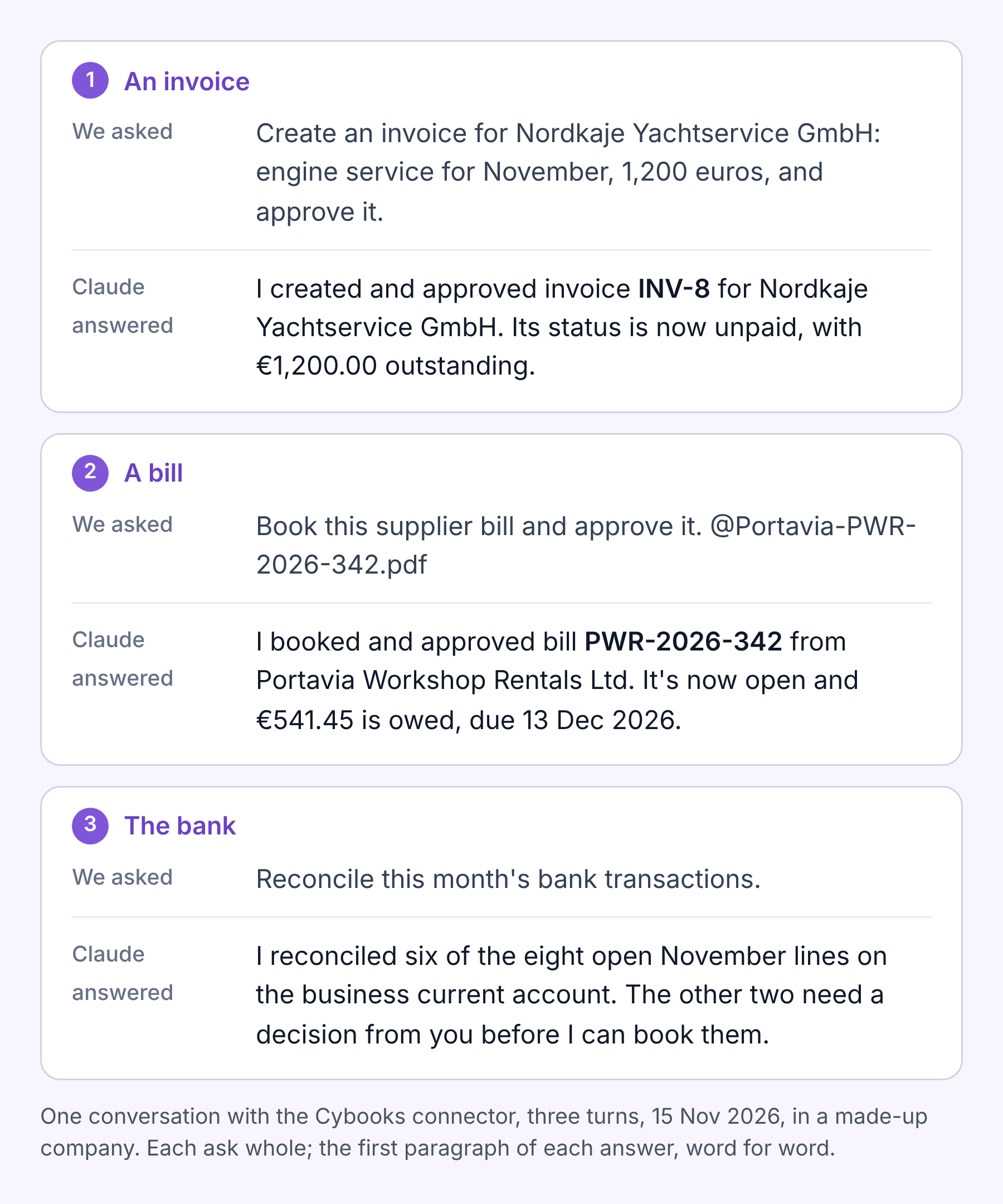
- An invoice. Claude created the invoice and approved it. Then it said that the invoice had no due date, and asked whether to set one.
- A bill. Claude read the supplier’s PDF, booked the bill and approved it. It added that the PDF itself was not attached to the bill yet.
- The bank. Claude reconciled six of the eight open lines, each an exact match on amount and reference. It asked about the other two: an account fee with no supplier set up, and a card purchase with no receipt in the books.
I reconciled six of the eight open November lines on the business current account. The other two need a decision from you before I can book them.
Claude acts as the person who signed in, within their permissions, in one company. Every change is in the audit trail with who, what and when.
What Claude can do in your books
- Read your live figures: the VAT position, profit and loss, the balance sheet, bank balances
- Create and approve invoices and bills
- Reconcile bank lines with your invoices and bills
Six lines reconciled and two left open, each with the question that would settle it.
The skills review what the books show. They are not an audit and not tax advice, and they cannot see a document that is not in the figures.
A VAT return stays the taxpayer's own: check it with your accountant before you file.
- They post nothing. A skill posts nothing to your books. Connected, the one thing it can start in Cybooks is a new review run, and only after you say yes.
- They do not file. The VAT return skill builds the files. You upload them yourself.
- Cyprus VAT and VIES. The One Stop Shop return and payroll returns are not covered.
- Your files go to Claude. A skill runs in your own Claude, and the files you attach go to Claude, not to Cybooks. The VAT return skill sends the EU VAT numbers you look up to the EU’s VIES service.
- No assurance words. A report says what was tested and what was found, and stops there.
A skill reads and reports. What happens in the books and at the tax portal stays with you.
The three bundled scripts have 82 automated tests. Each skill was also run end to end by a fresh Claude agent that had the skill and the files and nothing else: a real ledger export, a made-up VAT quarter and 18 generated PDF bills and invoices. The latest changes are covered by the script tests, not all by a fresh run.
For the VAT return skill, scanned or photographed documents are not tested yet either. The documents in our example were clean images made for the demo, so they say nothing about a scan or a phone photo.
Found a mistake, or a check that should be there? Open an issue on GitHub.
82 tests on the scripts, five things not tested yet, and all of it written down.
An assistant that reads documents is useful. One that follows written rules, shows its tests and says what it could not check gives you something to review.
The four skills are free and open source. Use them on your own files, and connect Cybooks when you want Claude to work on your live books.
Claude is a trade mark of its owner. Cybooks is not affiliated with it, and no endorsement is implied.